

Configuration overview
cartapel is configured by a directory of HCL files. The directory is a self-contained bundle — config, roles, dashboards, and any custom widget/page code all live inside it — so the whole panel is one portable, versionable folder you point --config at.
There is an in-app visual builder that edits this same config, but it writes the identical HCL. The files are the source of truth.
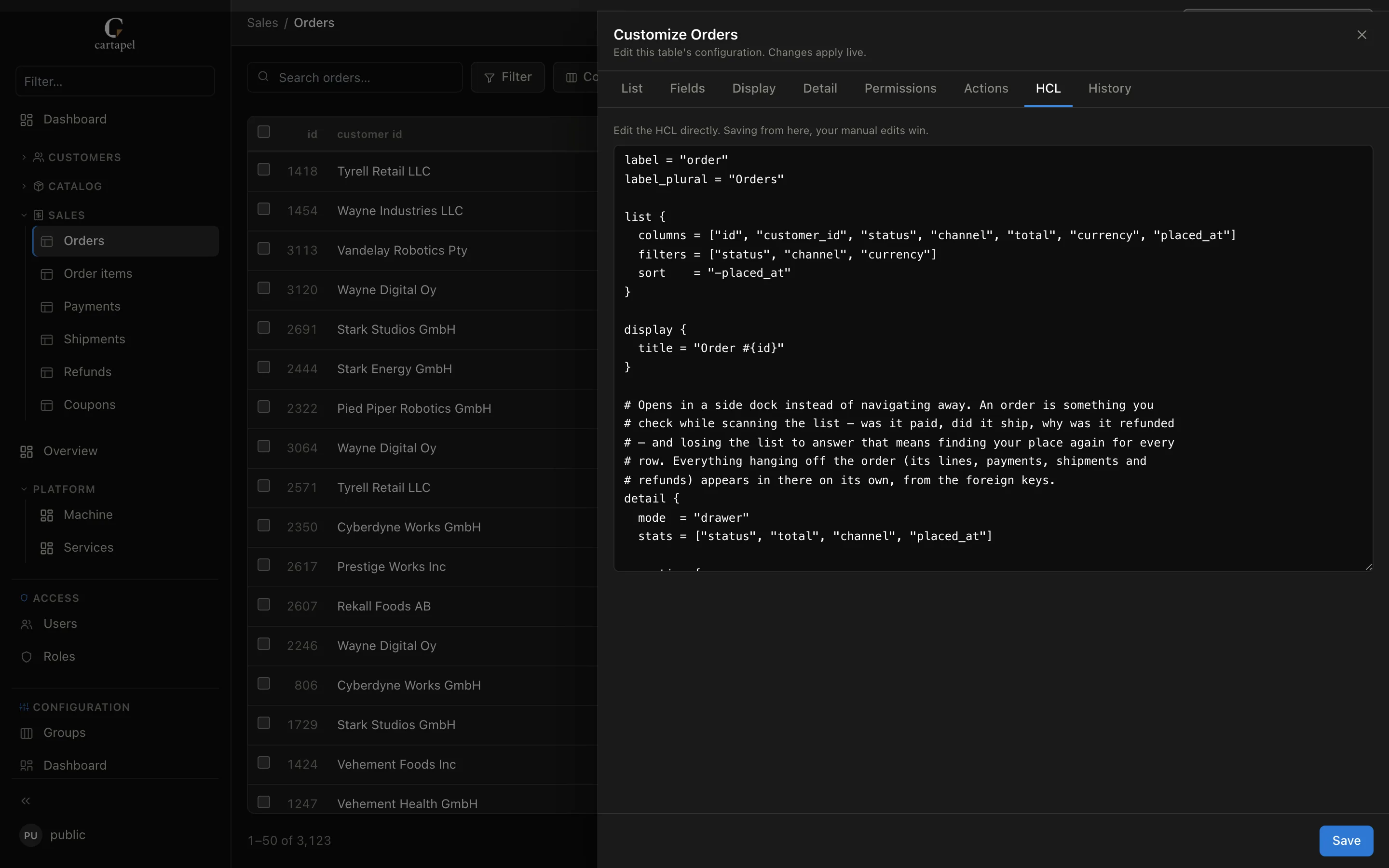
Every file below can also be written from the panel itself — each table has a Customize drawer whose HCL tab shows the file it is about to write. The editor and the file are the same configuration, not two sources of truth.
Layout: config/ + screens/
The layout of the config directory is the layout of the sidebar. Globals live in the reserved config/ folder; everything you navigate to — tables and pages — lives under screens/, one folder per navigation group:
admin/
├── config/                     # reserved — globals + shared assets, never a group
│   ├── cartapel.hcl            #   brand, theme, the `main` source, defaults
│   ├── auth.hcl               #   roles & permissions
│   ├── dashboard.hcl          #   dashboard widgets
│   └── widgets/               #   shared custom-widget JS (served at /static, session required)
│       └── sparkline.js
├── public/                      # reserved — the ONLY public folder, no session required
│   └── logo.svg                #   brand_logo / logo_light / logo_dark point here
└── screens/                    # every table and page lives here
    ├── customers/              # a sidebar group (it has a _group.hcl)
    │   ├── _group.hcl         #   its label, icon, order, table order
    │   ├── customers/         #   one folder per table — the folder name is the table
    │   │   └── screen.hcl     #     list/fields/actions (empty = introspected defaults)
    │   └── subscriptions/
    │       └── screen.hcl
    └── overview/
        ├── _group.hcl
        └── summary/            # a page of panels instead of a table
            ├── screen.hcl     #   panel { } blocks
            └── queries.hcl     #   named read-only queries its panels call
Config files are discovered recursively; load order is deterministic (files sorted by path). The rules the diagram doesn't show:
- A table is a folder holding a
screen.hcl; the folder name is the table name. An emptyscreen.hclrenders the table from introspected defaults. - A
_group.hclmakes its folder a sidebar group and sets its label, icon and order. Tables in a folder without one land in a trailing "Ungrouped" group. See Groups & navigation. - A page is the same shape — a folder whose
screen.hclholdspanel { }blocks instead of table config.page.hclis an accepted synonym for such a file. See Pages & queries. - Template variables render only where they are read — a control appears on a page or the dashboard when one of its panels actually references
, not merely because the variable exists in the bundle. - A
queries.hclin any folder contributes named read-only queries;variables.hclandsources.hclwork the same way for template variables and extra data sources. Names must be unique across the bundle. - The file set under
screens/is closed —screen.hcl,page.hcl,_group.hcl,queries.hcl,variables.hcl,sources.hcl. Any other.hclname there is a load error.
The reserved config/ folder
Show
config/ is special: it is never a sidebar group and is never scanned for tables. It holds exactly three global files plus a widgets/ asset folder:
| File | Contents |
|---|---|
config/cartapel.hcl | Brand, logo, locale, per_page, the secret key, theme { }, and the source "…" { } blocks. |
config/auth.hcl | role "…" { } blocks — the permission model. See Roles & permissions. |
config/dashboard.hcl | The home dashboard's panel { } blocks. See Dashboard. |
config/i18n/<locale>.hcl or .json | One dictionary per language for everything your config names — labels = { "text" = "translation" } in HCL, a flat object in JSON. See Localization. |
config/widgets/*.js | Shared custom-widget web components, served at /static/config/widgets/. See Pages & queries. |
Putting anything else in config/ is a loud load error. Folders whose name starts with an underscore are never treated as sidebar groups.
The reserved public/ folder
Show
public/ is the one part of the config bundle served with no session — at /public/<path>, versus /static/<path> for everything else in config/, which stays behind login. It exists for exactly one reason: the login screen renders before there's a session to check, so a brand logo referenced from config/ (session-gated) would never load there.
Put brand_logo/theme.logo_light/theme.logo_dark targets here — see Theming — and nothing else; anything under public/ is reachable by anyone who can reach the panel at all, config author's choice. It isn't scanned for .hcl files, so it never turns into a sidebar group or a table by accident. Same traversal/symlink-escape and extension checks as /static apply, just without the auth requirement.
config/cartapel.hcl — globals
Show
brand      = "Acme Admin"
brand_logo = "https://acme.example/logo.png"
per_page   = 100
locale     = "en"

# The signing secret. Prefer env interpolation over a literal.
secret_key = "env:CARTAPEL_SECRET_KEY"

theme {
  preset = "cartapel"          # "cartapel" (default) | "django"
  accent = "hsl(33 100% 50%)"
  mode   = "auto"             # "light" | "dark" | "auto"
}

# The database cartapel reads. Exactly one postgres source must be `primary`.
source "main" {
  type    = "postgres"
  url     = "env:CARTAPEL_DB"   # or a literal postgres:// url
  schemas = ["public"]
  primary = true
}
Top-level [cartapel] keys:
| Key | Type | Description |
|---|---|---|
brand | string | Panel name, shown in the header. Defaults to cartapel. |
brand_logo | string | Logo URL, data URL, or a bundle asset filename served under /static/. |
locale | string | The instance's default language. Each viewer can pick their own from the user menu (the browser's language applies first); locale is what a viewer gets when neither says otherwise. See Localization. |
strings | map | Override individual UI strings: { key = "value" } applies in every language, { es = { key = "valor" } } in one. |
per_page | number | Default list page size — 100 when unset. A table's list.per_page overrides it. |
group_nav | string | Default sidebar mode for groups: expanded (default — every table is its own entry) or page (one entry per group; sibling tables become tabs). A group's own nav in _group.hcl overrides it. |
secret_key | string | Session-signing root. Supports env:/${}. Overridden by CARTAPEL_SECRET_KEY. Required somewhere. |
theme { } | block | Theme preset, accent, per-mode CSS token overrides, logos — see Theming. |
source "…" { } | block | A named data source. The primary postgres one is the database cartapel introspects. |
disable_sql_preview | bool | Hardening: disable the dashboard builder's ad-hoc SQL preview (admin-supplied SELECTs). Blocks arbitrary read-SQL even for admins. Default false. |
disable_webhooks | bool | Hardening: disable outbound webhook actions (an SSRF surface). Default false. |
group_nav = "page"    # every group collapses to one entry with siblings as tabs

strings = {
  new_record        = "Add {label}"           # every language
  es = { new_record = "Añadir {label}" }       # Spanish only, wins over the flat one
}

disable_sql_preview = true   # a public/sensitive instance
disable_webhooks    = true
theme { }
| Key | Description |
|---|---|
preset | Named base theme: cartapel (default) or django. |
accent / accent_btn | Shorthand accent overrides (win over the preset). |
light / dark | Per-mode maps of CSS token → value. Keys are cartapel token names without the -- prefix (page, surface, ink, accent, good, critical, …). |
mode | Force light, dark, or auto (default). |
logo_light / logo_dark | Per-mode brand logo, overriding brand_logo for that mode. |
source "…" { }
Databases (and anything else cartapel reads rows from) are declared as named sources. The primary one is what cartapel introspects and serves by default — and when no source is declared at all, the --db / CARTAPEL_DB URL becomes the primary implicitly, its engine picked from the scheme. That is why the one-command run needs nothing but the URL. Additional sources plug extra tables into the same panel: point a table at one with from { source = "…" }, and lists, detail pages, editing, filters, search, import/export and audit all work the same way.
| Key | Description |
|---|---|
type | "postgres", "mysql" (also accepts "mariadb"), "clickhouse" (read-only), "grafana", "http", "files" or "s3". |
url | Connection URL or endpoint. Supports env:NAME / ${NAME}. |
schemas | List of schemas to introspect (postgres only). Defaults to ["public"]. |
primary | Marks the source cartapel introspects and serves by default. Implied with a single database source. |
token_env / header | Secret attachment for http and grafana sources — never reaches the browser. |
roles | Restrict a source to these roles (non-admins need an explicit match). |
--db postgres://… / CARTAPEL_DB overrides the primary source's URL, so the same bundle can run against dev, staging or prod by swapping one env var.
A full worked example for every type — Postgres, MySQL & MariaDB, ClickHouse, Grafana, files, S3-compatible storage and HTTP — is on its own page: Data sources.
Environment interpolation
Show
secret_key and every source's url accept env:NAME or ${NAME}, replaced at load time with the environment variable NAME. (An http source's token_env names an env var directly, no prefix.) Use it to keep secrets out of committed config:
source "main" {
  type    = "postgres"
  url     = "env:CARTAPEL_DB"
  primary = true
}

secret_key = "${CARTAPEL_SECRET_KEY}"
Validation & hot-reload
Show
Config is validated as it loads, and again on every in-app edit:
- Unknown keys are rejected. Every block uses strict parsing, so a typo like
filterz = [...]is a load error, not a silent no-op. - Duplicate labeled blocks are rejected — two
field "x"blocks, or two configs for the same table, fail loudly rather than silently merging. formatandcolorare validated against their allowed vocabularies (see Fields & widgets).- Named queries must be unique across the whole bundle.
Config edits hot-reload with no restart — both through the in-app builder and by editing the files on disk (cartapel watches the config directory, debounced). A bad edit can never replace the running config: builder writes are trial-parsed first with a failed reload restoring the previous state, and a broken on-disk edit keeps the last good config and logs the error.
Round-tripping through the visual builder drops comments
The builder regenerates canonical HCL from the parsed model. If you keep comments or bespoke formatting in a file, edit it as raw HCL (in your repo or the raw editor), not through the visual form.
Next
- Data sources — Postgres, MySQL, ClickHouse, Grafana, files, S3 and HTTP, each with a worked example.
- Uploads & file storage — the
file { }field (widget = "image"or generic), the upload request, and local-disk or S3-compatible storage. - Tables — every block in a
screen.hcl. - Groups & navigation —
_group.hclin detail.